Send a customer a link to pay
Copy the invoice's pay link with Copy link, then paste it into your own email or text. Zaras doesn't send this link for you.
Copy the pay link
On the web:
- Open the invoice.
- Press More at the top of the invoice.
- Choose Copy link.
- Paste the link into your own email or text.
In the Zaras app:
- Open the invoice and tap Collect payment.
- Tap Copy link, or Share the link from your phone.
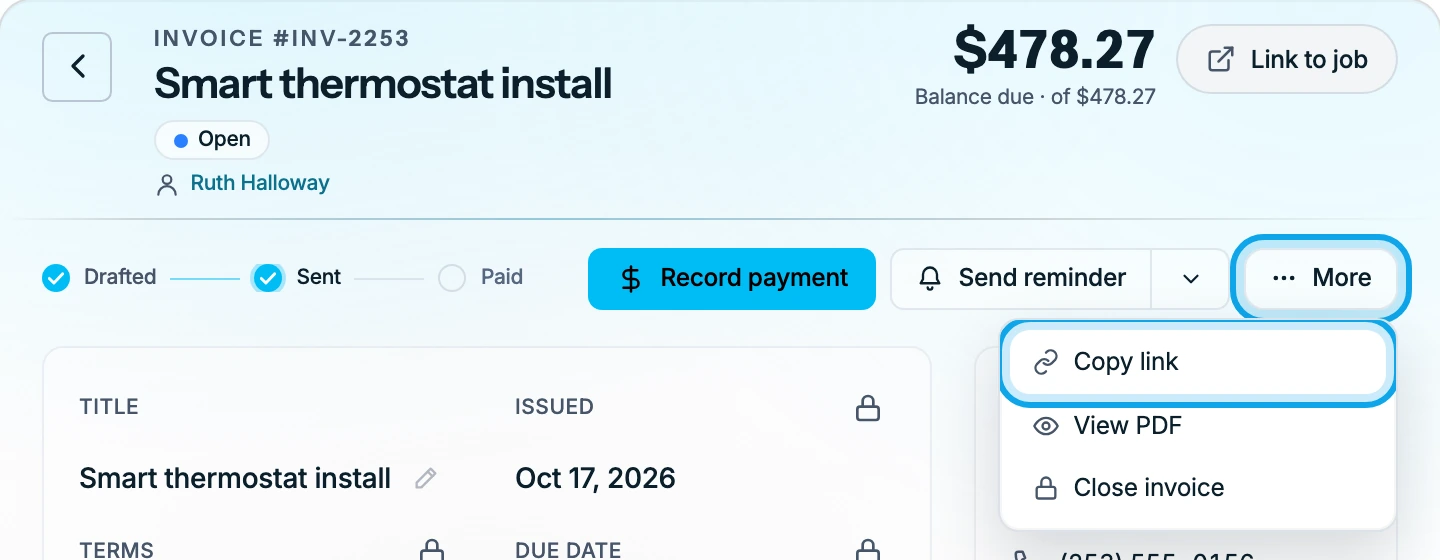
What you see
Link copied. confirms it. On Android 13 and later, your phone shows its own notice instead. The link opens the customer's invoice page, where they can pay by card. Copying again gives the same link. In the app, it clears from your clipboard after a minute.
Copy link is missing
It shows only with online payments on, on an Open or Partially paid invoice. A balance too small for a card payment gets no link either.
Copy link is greyed out
Confirm your email to send emails and invites means your own email is not confirmed yet. Confirm it, then copy again.
Who can do this
Copying the link needs Manage invoices. Owners, admins, office and technicians hold it by default. Others ask an owner or admin under Settings → Team & roles → Roles.